Everything after you ship.
One project.
Know when production breaks, what users do, and what changed. PostDeploy brings monitoring, errors, analytics, status pages, and changelogs together.
14 days free. No credit card.
| Time | Uptime, percent |
|---|---|
| 15:00 | 97.18 |
| 16:00 | 100.0 |
| 17:00 | 100.0 |
| 18:00 | 100.0 |
| 19:00 | 100.0 |
| 20:00 | 100.0 |
| 21:00 | 100.0 |
| 22:00 | 98.61 |
| 23:00 | 100.0 |
| 00:00 | 100.0 |
| 01:00 | 100.0 |
| 02:00 | 100.0 |
| 03:00 | 100.0 |
| 04:00 | 100.0 |
| 05:00 | 100.0 |
| 06:00 | 100.0 |
| 07:00 | 100.0 |
| 08:00 | 100.0 |
| 09:00 | 100.0 |
| 10:00 | 100.0 |
| 11:00 | 100.0 |
| 12:00 | 100.0 |
| 13:00 | 100.0 |
| 14:00 | 100.0 |
When a cron job goes quiet, you know.
Monitor checks your site and API. Heartbeats treat a missing ping from a scheduled job as a failure, so silence does not wait for a customer email.
API postdeploy.dev
Operational HTTP, 60s| Hour | Average response, milliseconds |
|---|---|
| 2026-10-06 03:00 UTC | 61 |
| 2026-10-06 04:00 UTC | 58 |
| 2026-10-06 05:00 UTC | 54 |
| 2026-10-06 06:00 UTC | 57 |
| 2026-10-06 07:00 UTC | 57 |
| 2026-10-06 08:00 UTC | 57 |
| 2026-10-06 09:00 UTC | 58 |
| 2026-10-06 10:00 UTC | 58 |
| 2026-10-06 11:00 UTC | 56 |
| 2026-10-06 12:00 UTC | 64 |
| 2026-10-06 13:00 UTC | 61 |
| 2026-10-06 14:00 UTC | 65 |
| 2026-10-06 15:00 UTC | 77 |
| 2026-10-06 16:00 UTC | 73 |
| 2026-10-06 17:00 UTC | 76 |
| 2026-10-06 18:00 UTC | 71 |
| 2026-10-06 19:00 UTC | 71 |
| 2026-10-06 20:00 UTC | 74 |
| 2026-10-06 21:00 UTC | 62 |
| 2026-10-06 22:00 UTC | 143 |
| 2026-10-06 23:00 UTC | 68 |
| 2026-10-07 00:00 UTC | 69 |
| 2026-10-07 01:00 UTC | 63 |
| 2026-10-07 02:00 UTC | 69 |
| 2026-10-07 03:00 UTC | 69 |
| 2026-10-07 04:00 UTC | 69 |
| 2026-10-07 05:00 UTC | 69 |
| 2026-10-07 06:00 UTC | 64 |
| 2026-10-07 07:00 UTC | 70 |
| 2026-10-07 08:00 UTC | 65 |
| 2026-10-07 09:00 UTC | 64 |
| 2026-10-07 10:00 UTC | 66 |
| 2026-10-07 11:00 UTC | 68 |
| 2026-10-07 12:00 UTC | 60 |
| 2026-10-07 13:00 UTC | 69 |
| 2026-10-07 14:00 UTC | 68 |
Know what people use. Keep their privacy.
Measure counts pageviews and custom events without cookies, raw IP storage, or persistent visitor identifiers. Daily identifiers rotate, so visits cannot be linked across days.
| Day | Pageviews | Visitors |
|---|---|---|
| 2026-10-01 | 6 | 6 |
| 2026-10-02 | 3 | 3 |
| 2026-10-03 | 18 | 12 |
| 2026-10-04 | 3 | 3 |
| 2026-10-05 | 4 | 3 |
| 2026-10-06 | 8 | 4 |
| 2026-10-07 | 5 | 3 |
Top pages
| Page | Pageviews |
|---|---|
| / | 35 |
| /docs | 4 |
| /tools/website-health-check | 3 |
| /alternatives/fathom | 1 |
| /changelog | 1 |
No tracking cookies. No persistent visitor identifiers.
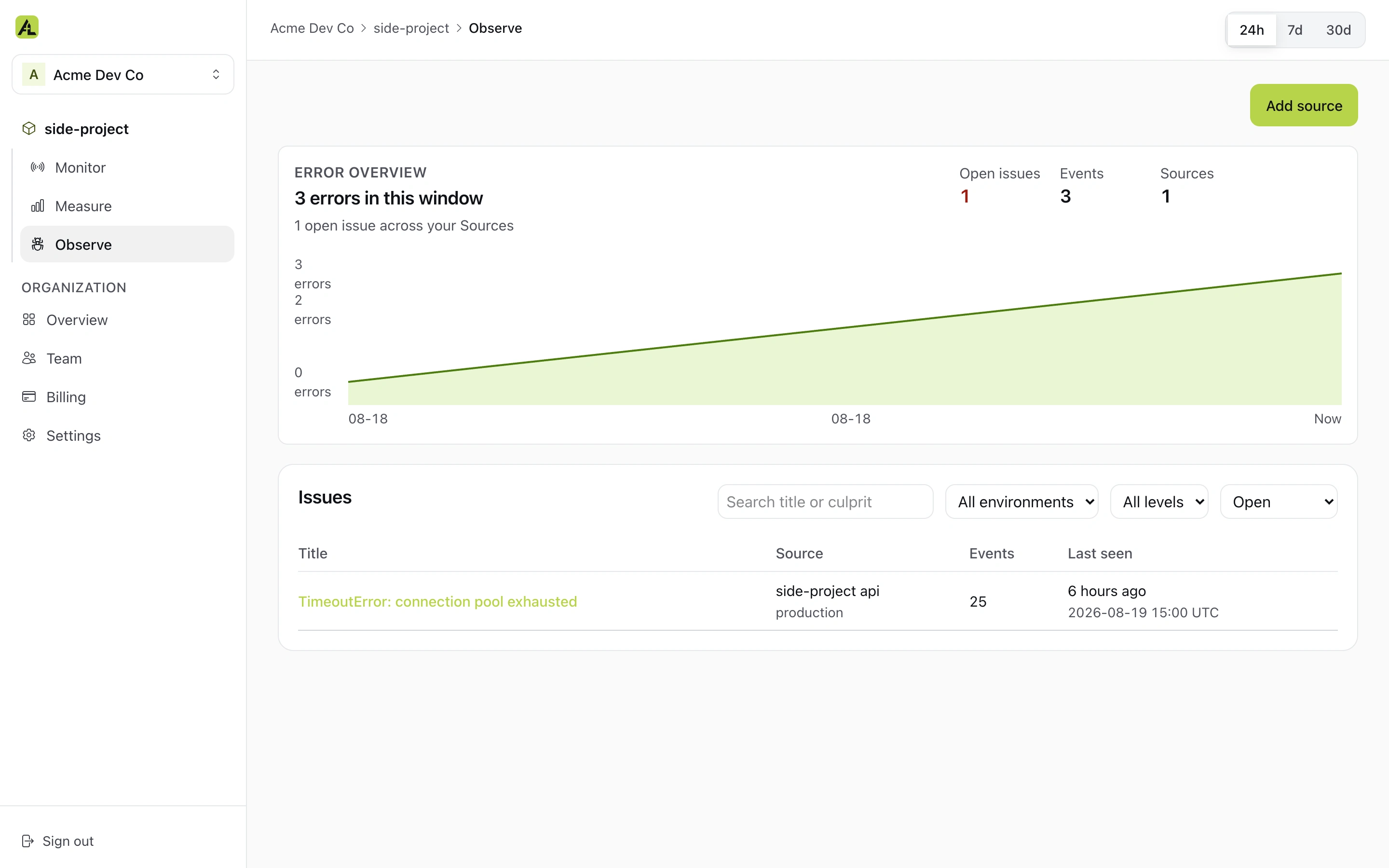
See the errors your project reports.
Inspect reported errors in the same project that holds your monitors and analytics.
Give users the answer before the email.
Publish a public status page when something changes. Keep releases in a changelog beside the project your agent manages.
All systems operational
postdeploy| Day | Uptime, percent | State |
|---|---|---|
| 2026-08-24 | 100.0 | Operational |
| 2026-08-25 | 100.0 | Operational |
| 2026-08-26 | 100.0 | Operational |
| 2026-08-27 | 100.0 | Operational |
| 2026-08-28 | 100.0 | Operational |
| 2026-08-29 | 100.0 | Operational |
| 2026-08-30 | 100.0 | Operational |
| 2026-08-31 | 100.0 | Operational |
| 2026-09-01 | 100.0 | Operational |
| 2026-09-02 | 100.0 | Operational |
| 2026-09-03 | 100.0 | Operational |
| 2026-09-04 | 100.0 | Operational |
| 2026-09-05 | 100.0 | Operational |
| 2026-09-06 | 100.0 | Operational |
| 2026-09-07 | 100.0 | Operational |
| 2026-09-08 | 100.0 | Operational |
| 2026-09-09 | 100.0 | Operational |
| 2026-09-10 | 99.86 | Down |
| 2026-09-11 | 100.0 | Operational |
| 2026-09-12 | 100.0 | Operational |
| 2026-09-13 | 100.0 | Operational |
| 2026-09-14 | 100.0 | Operational |
| 2026-09-15 | 99.72 | Down |
| 2026-09-16 | 100.0 | Degraded |
| 2026-09-17 | 100.0 | Operational |
| 2026-09-18 | 100.0 | Operational |
| 2026-09-19 | 100.0 | Operational |
| 2026-09-20 | 100.0 | Operational |
| 2026-09-21 | 100.0 | Degraded |
| 2026-09-22 | 100.0 | Degraded |
| 2026-09-23 | 100.0 | Operational |
| 2026-09-24 | 100.0 | Operational |
| 2026-09-25 | 100.0 | Degraded |
| 2026-09-26 | 100.0 | Operational |
| 2026-09-27 | 100.0 | Operational |
| 2026-09-28 | 100.0 | Operational |
| 2026-09-29 | 100.0 | Degraded |
| 2026-09-30 | 100.0 | Degraded |
| 2026-10-01 | 100.0 | Operational |
| 2026-10-02 | 100.0 | Degraded |
| 2026-10-03 | 100.0 | Operational |
| 2026-10-04 | 100.0 | Operational |
| 2026-10-05 | 100.0 | Operational |
| 2026-10-06 | 100.0 | Degraded |
| 2026-10-07 | 100.0 | Operational |
| Day | Uptime, percent | State |
|---|---|---|
| 2026-08-24 | 100.0 | Operational |
| 2026-08-25 | 100.0 | Operational |
| 2026-08-26 | 100.0 | Operational |
| 2026-08-27 | 100.0 | Operational |
| 2026-08-28 | 100.0 | Operational |
| 2026-08-29 | 100.0 | Operational |
| 2026-08-30 | 100.0 | Operational |
| 2026-08-31 | 100.0 | Operational |
| 2026-09-01 | 100.0 | Operational |
| 2026-09-02 | 100.0 | Operational |
| 2026-09-03 | 100.0 | Operational |
| 2026-09-04 | 100.0 | Operational |
| 2026-09-05 | 100.0 | Operational |
| 2026-09-06 | 100.0 | Operational |
| 2026-09-07 | 100.0 | Operational |
| 2026-09-08 | 100.0 | Operational |
| 2026-09-09 | 100.0 | Operational |
| 2026-09-10 | 100.0 | Operational |
| 2026-09-11 | 100.0 | Operational |
| 2026-09-12 | 100.0 | Operational |
| 2026-09-13 | 100.0 | Operational |
| 2026-09-14 | 100.0 | Operational |
| 2026-09-15 | 100.0 | Operational |
| 2026-09-16 | 100.0 | Operational |
| 2026-09-17 | 100.0 | Operational |
| 2026-09-18 | 100.0 | Operational |
| 2026-09-19 | 100.0 | Operational |
| 2026-09-20 | 100.0 | Operational |
| 2026-09-21 | 100.0 | Operational |
| 2026-09-22 | 100.0 | Operational |
| 2026-09-23 | 100.0 | Operational |
| 2026-09-24 | 100.0 | Operational |
| 2026-09-25 | 100.0 | Operational |
| 2026-09-26 | 100.0 | Operational |
| 2026-09-27 | 100.0 | Operational |
| 2026-09-28 | 99.31 | Down |
| 2026-09-29 | 100.0 | Operational |
| 2026-09-30 | 100.0 | Operational |
| 2026-10-01 | 100.0 | Degraded |
| 2026-10-02 | 100.0 | Operational |
| 2026-10-03 | 100.0 | Operational |
| 2026-10-04 | 100.0 | Operational |
| 2026-10-05 | 100.0 | Operational |
| 2026-10-06 | 100.0 | Operational |
| 2026-10-07 | 100.0 | Operational |
One square per day, last 45 days. Read the incident record
Set up your whole project
in one conversation.
Connect the coding agent you already use, choose a PostDeploy project, and approve access. Then ask it to add monitors, heartbeats, analytics, a status page, and a changelog. Review everything it creates in PostDeploy.
$ claude
> Configure my existing PostDeploy project:
  monitor the API and site, watch the
  nightly backup for silence, add
  cookieless analytics, and publish a
  status page and changelog.

✓ monitor.create          api.postdeploy.dev
✓ monitor.create          postdeploy.dev
✓ monitor.create          nightly-backup heartbeat
✓ measure.create_source   cookieless analytics
✓ status.ensure_workspace status.postdeploy.dev

Setup complete.
One agent connection gives your project
MCP OAuth applies after you choose a project. Revoke an agent's access in Settings when you need to.
Know what happens after your next deploy.
Start your 14-day free trial14 days free. No credit card.